Inside Clafk
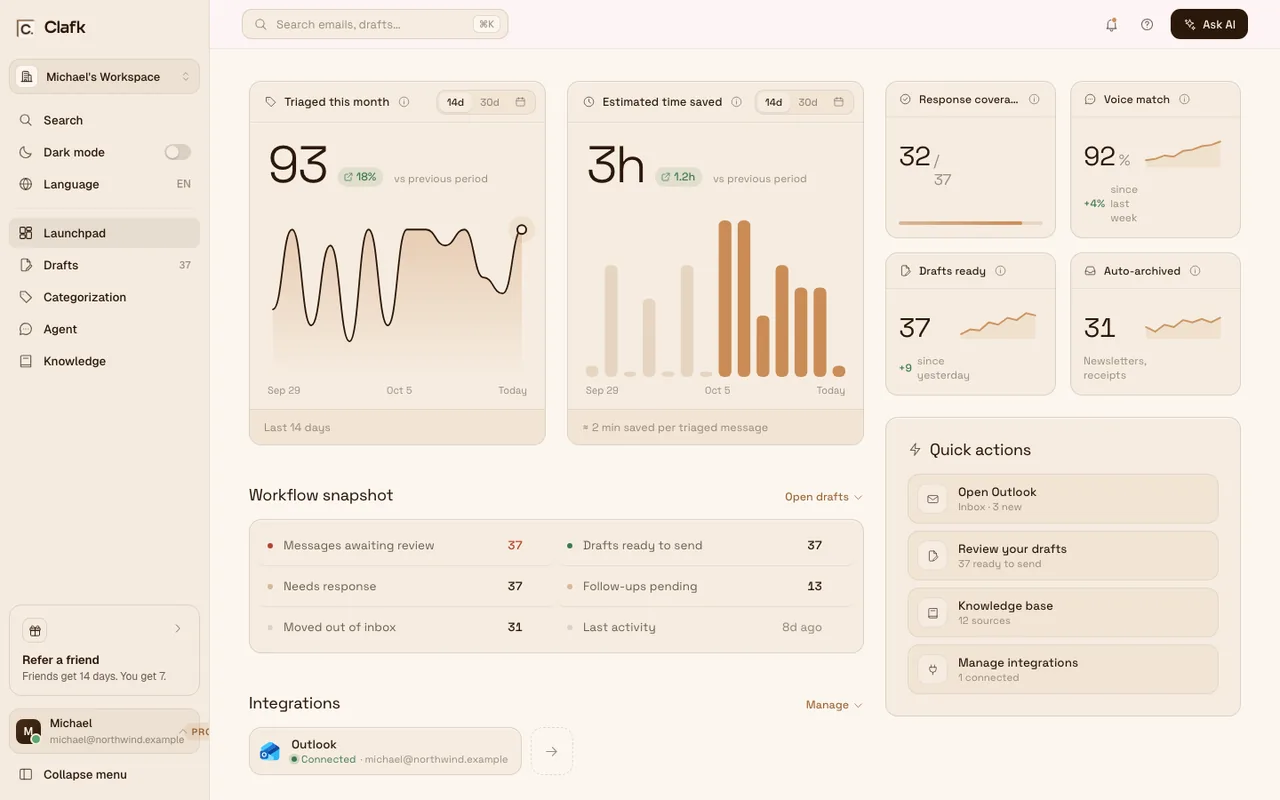
The Clafk Launchpad: emails triaged this month, estimated time saved, drafts ready and mail auto-archived
Gmail
Outlook
EUcompany
GDPRcompliant
An example morning

142 new emails. 9 need you. Their replies are already written.

Everything else is sorted out of the way. You start the day with replies, not a backlog.
Platform

Your inbox, handled as it arrives. Sorted, drafted, answered.

Sorted before you open it.

Replies you owe stay in front. Receipts, newsletters and alerts step aside.See the inbox organizer
Focus mode.Only what needs you stays in your inbox.
Respects your labels.Anything you filed by hand stays where you put it.

Replies that sound like you.

Your greeting, your tone, your sign-off. Prices and policies come from the knowledge you add.See the email draft writer
Your tone.Learned from replies you have already sent.
Your facts.Prices and policies from the knowledge you add.

Ask it. Clafk gets it ready.

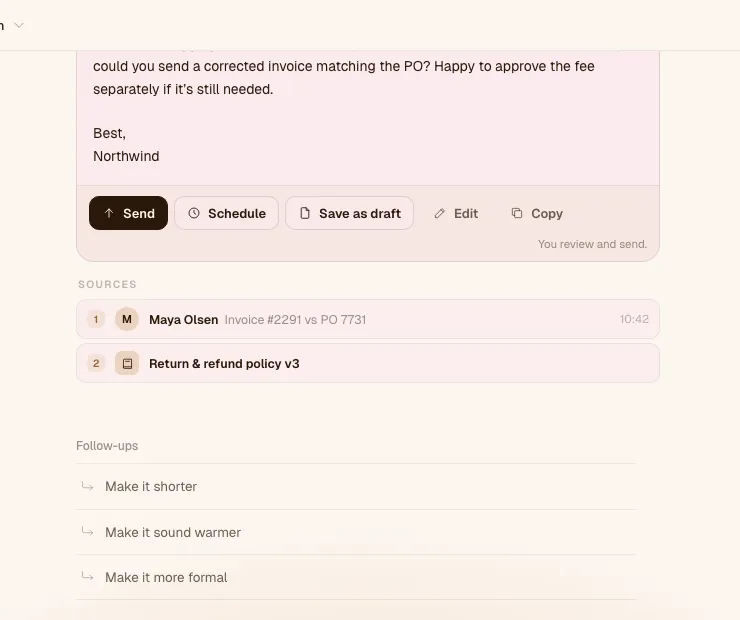
Ask the way you would ask a colleague. Clafk finds the thread and writes the email.
An email written in Clafk Agent with Send, Schedule and Save as draft buttons, citing Maya Olsen’s email and the return and refund policy
Find it fast.The quote from March, the PO number, what you promised a customer.
Your call.Send it, save it as a draft or schedule it.

Grounded in what you know.

Add your pricing, policies and help pages once. Clafk draws on them when it drafts a reply.See how Clafk works
Links and text.Website pages, or policies you paste in.
Optional.Clafk drafts without it. Your knowledge makes replies specific.
Understands

It knows what you add. So replies use your facts, not guesses.

Drafts where it counts.Replies are written for the emails that need one.
Uses your own facts.Prices, dates and policies from the knowledge you add.
Says when it is unsure.No made-up answers. Where a fact is missing, the draft says you’ll check.
Works where you already are.Inside Gmail and Outlook. Nothing new to learn.

Drafts are ready when you are.

Open your inbox to replies, not a to-do list.

Your sender’s language.

Every draft is written in the language of the email it answers. Nothing to set up.

How it works

Ready in minutes. Connect once. Clafk sorts every new email from then on.

01Connect.Connect Gmail or Outlook. Nothing to install.
02Learn.Clafk picks up your tone from what you have sent.
03Draft.Replies wait in your Drafts folder. Edit, then send.
Start for free7-day free trial · Gmail and Outlook
Security

Your inbox stays yours. You decide what is sent. Your mail is never sold.

Read the security overview
Never sends on its own.Only when you press Send, schedule an email or ask it to unsubscribe you.
Not used to train AI models.Clafk doesn’t use your email or documents to train AI models.
GDPR compliant.EU company. Encrypted in transit.
Disconnect anytime.Clafk deletes that mailbox’s stored message details and drafts.

Clafk’s use of Google user data follows the Google API Services User Data Policy, including the Limited Use requirements. Privacy Policy

Does Clafk ever send a reply on its own?

No. Clafk drafts, and every draft waits inside your existing email client until you review and hit send. Clafk sends an email only when you tell it to: when you press Send in Agent, when a message you scheduled reaches the time you chose, or when you ask it to unsubscribe you from a sender. You stay the author and the accountable one on every message.

How does Clafk know what's in my docs?

You add your knowledge to Clafk — paste in guides, FAQs and policies, or add pages from your website. Clafk draws on that knowledge when it prepares a reply, and writes in the style it has learned from your past replies.

What if the answer isn't in my docs?

Clafk doesn’t invent one. Where a fact is missing, the draft says you’ll check and come back to the sender, so you can add the detail before you send it.

Is my data used to train AI models?

No. Clafk does not use your emails, documents or other content to train AI models. To prepare a draft, it sends only the parts of an email the request needs to AI providers, which process them under their own API terms.

Does it work with shared inboxes like support@?

If that inbox has its own Gmail or Outlook sign-in, yes. Each connected mailbox is its own workspace, with its own subscription.

Which inboxes does Clafk work with?

Gmail, Google Workspace, Outlook.com and Microsoft 365.

Do I have to change how I use email?

No. Labels, folders and drafts appear in Gmail or Outlook like anything else. You keep working where you already do.

Do I need a card to start?

Yes. You add a payment method at checkout. The free trial is on your first mailbox, once per account: 7 days, or 14 if you joined through a referral link. Cancel before the trial ends and the paid subscription never starts.

Can I cancel anytime?

Yes. Cancel in Settings → Plans & Billing and you keep access until the end of the billing period.

How much does it cost?

Pro is 55 € a month billed monthly, or 44 € a month billed annually (528 € a year), plus VAT, per mailbox. Your first mailbox starts with a free trial. See pricing.

Pro from 44 €/month + VAT per mailbox, billed annually. No email count limit (fair use).See pricing
7-day free trial

Your first draft is minutes away.

Connect Gmail or Outlook. When the next email needs a reply, a draft is waiting in your Drafts folder.

Cancel before the trial ends and the paid subscription never starts.